-4.png?width=300&height=97&name=bucketlist-full-logo%20(2)-4.png)
For Platform Administrators:
This article is intended for Bucketlist platform administrators. If you are an employee or end-user, some features or settings described here may not be available to you.
If your users can not redeem within the Bucketlist platform and see a pop-up error stating there are insufficient funds, this means that the rewards float balance is low and not enough to cover the redemption cost.
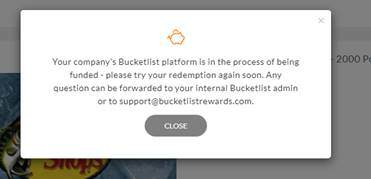
What is a rewards float?
Your platform has a rewards float that you fund for redemptions made under the Redeem section. The rewards float is a sitting balance of funds that only gets touched when points are redeemed for rewards. The rewards float is used when people within your Bucketlist platform redeem for the following items:
- Gift Cards
- Experiences (fulfilled by Bucketlist)
- Donations (fulfilled by Bucketlist)
- Swag and company merchandise (fulfilled by Bucketlist)
*The Rewards Float is different from the subscription for Bucketlist**
As an Admin, you can see the balance of funds via the ‘Account Balances’ tab in Admin Settings. This article can be helpful to understand more about the rewards float and how an admin can view the balance:
You can also generate a Redemption report in 'Reports' that includes:
- What rewards were redeemed
- Who redeemed (name, email, role, etc)
- Monetary value of the reward (point and dollar value)
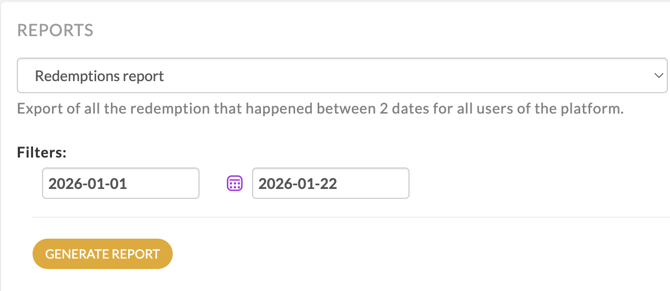

The redemption report is commonly used for financial reconciliation and taxation purposes.
How to fund your rewards float:
To fund your rewards float, you can use various methods. We recommend the following in order of efficiency and processing times to fund your rewards float:
- ACH (U.S. only)
- International/domestic wire transfer
- Credit Card (3.5% processing fee)
- Cheque
Please reach out to your Customer Success Manager or the Bucketlist support team (support@bucketlistrewards.com or via Contact Support on this page) for any invoice requests (please include the amount you would like to fund) or guidance on the float funding process.
|
ACH (US Only)
|
Wire Transfer (US and International)
|
|
Credit Card
|
Cheque
|
1. ACH (U.S. Only) - to Tango Card
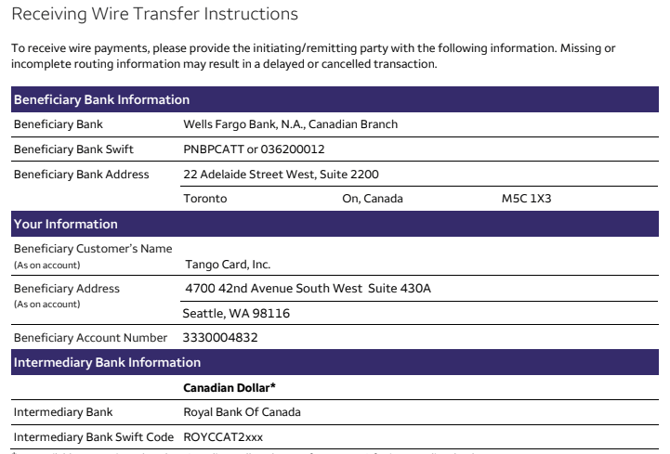
Use the information below to initiate an ACH or Wire transfer from your financial institution. Make sure to include the account number (you can obtain this from your Customer Success Manager or Bucketlist support) in the ACH/Wire transfer memo:
- Wells Fargo Bank
- ABA routing number: 121000248
- Bank account number: 4945710978
- Tango account number: A########
- Our SWIFT code is : WFBIUS6SSEA
- For ACH and Wire transfers our account name is: Tango Card Inc Collections
- Our address:
Tango Card Inc.
4700 42nd Ave SW, #430A
Seattle, WA 98116
IMPORTANT Email us at funding@tangocard.com and provide the information below once you initiated the transfer:
- Amount transferred
- Account number
- ACH/wire number
Once payment is received, Tango Cards usually processes this within 1 business day. It takes 3-5 business days until they receive funds from your bank, normally.
2. International/domestic wire transfer - to Tango Card
- Wire transfers are for US and international customers.
- Once payment is received, processing is usually 1 business day. It can take up to 2 business days to receive funds from your bank.
U.S. Dollar (USD) payments
Remit to Tango Card Inc, and please instruct the initiating bank to route the payment as follows:
Step 1: Send payment
| Beneficiary | Tango Card Inc Collections 4700 42nd Ave SW, #430A Seattle, WA, 98116 |
| Beneficiary Bank | Wells Fargo Bank 420 Montgomery Street San Francisco, CA 94104 |
| Beneficiary Account Number | 4945710978 |
| Routing number (US domestic): |
121000248 |
| Beneficiary SWIFT code (International): |
WFBIUS6SSEA |
| Reason/memo | Reference Tango account # for depositing funds. |
Step 2: Email funding@tangocard.com
-
Amount transferred
-
Your Tango account number
-
ACH/Wire transfer number
Funds will be applied to your account within 1-2 business days.
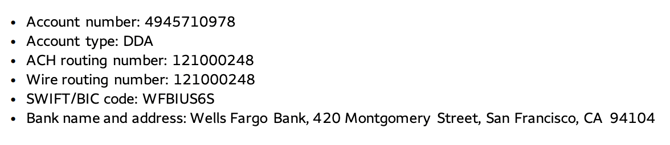
Canadian Dollar (CAD) payments
Remit to Tango Card Inc, and please instruct the initiating bank to route the payment as follows:
| Intermediary Bank | Royal Bank of Canada |
| Intermediary Bank SWIFT Code | ROYCCAT2xxx |
| Beneficiary’s Bank |
Wells Fargo Bank, N.A., Canadian branch |
| Beneficiary’s Bank SWIFT |
PNBPCATT or 036200012 (SWIFT Field 57a) |
| Beneficiary’s Account Number |
3330004832 |
| Beneficiary’s Name |
Tango Card, Inc. |
| Beneficiary’s Address |
4700 42nd Avenue SW, Suite 430A Seattle, WA 98116 USA |
Note: The ABA/Routing number is not required for foreign currency wires.
Intermediary Bank is recommended if the sender’s payment initiation platform supports it.
-
OUR: Remitter pays all fees.
-
SHA: Remitter pays initiating bank fees and first intermediary bank fees. Beneficiary pays any additional fees.
-
BEN: Remitter pays initiating bank fees. Beneficiary pays first intermediary bank and any additional fees.
3. Credit Card (3.5% processing fee) - via Bucketlist/Tango Card
- Please contact your Customer success manager or support if you are paying directly to your float balance and need to add/update credit card information. We will send you a secure link to provide this information.
- Please contact us to fund your float via a credit card already on file, and specify the amount you wish to fund.
- Once payment has been received, processing usually takes about 1 business day. If this is a first time use of this credit card, it may take up to 72 hours for approval to process.
4. Cheque - to Tango Card (US Only) or Bucketlist
- Cheques usually take the longest processing time, and can take up to 7 days for normal processing.
Send your cheque to the following address:
Physical Checks (USD):
ATTN: Accounts Receivable
Tango Card, Inc.
PO Box 850862
Minneapolis, MN 55485-0862
*To ensure a quicker processing time, write your account name and account number on the memo line. (You may request your Account Number from a Bucketlist Team member)
If you need additional support:
Please contact either your designated customer success manager at Bucketlist, or support (support@bucketlistrewards.com)