-4.png?width=300&height=97&name=bucketlist-full-logo%20(2)-4.png)
What is AI Suggestions?
AI Suggestions helps your employees write better recognitions. When someone is drafting a recognition, they can ask the AI for a suggested improvement — then use it, edit it, or keep what they originally wrote.
Good recognition is a skill, and not everyone finds it easy. A quick "thanks for your help yesterday" is well-intentioned but doesn't land the way a specific, personal message does. AI Suggestions gives employees a way to strengthen a draft in the moment, without needing training or a style guide.
How to Enable AI Suggestions
Contact your account manager or our support team to have it turned on for your organization.
The suggestion prompt can also be customized for your company, so the guidance employees receive reflects how your organization talks about recognition. Talk to your account manager if you'd like to tailor it.
The feature is available in the languages your platform supports, not English only.
What the AI looks for
Suggestions are aimed at making a recognition more meaningful and more likely to be appreciated. That includes:
- Specificity — naming what the person actually did, rather than general praise
- Tone and personalization — writing that reads as genuine rather than generic
- Inclusive language — flagging phrasing that could land poorly across a diverse team
- Appropriateness — steering away from content that wouldn't be suitable for a workplace feed
- Clarity — grammar, wording, and readability
How employees use it
- The employee writes a recognition as usual.
- Instead of submitting right away, they click the AI Improve button.
- Their draft is sent to the AI service, which returns a suggested version.
- From there they can:
- Generate a New Suggestion
- Use the suggestion as written
- Use the suggestion and Edit it for a revised version
- Keep their original and discard the suggestion entirely
The recognition can then be submitted and posts as normal.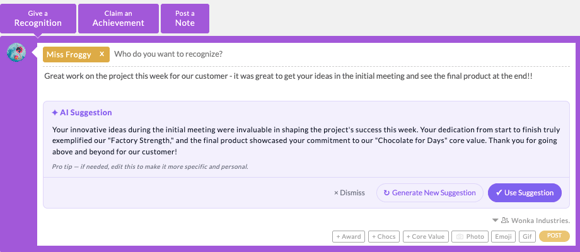
The important part: this is entirely optional and entirely in the employee's hands. Nobody is required to use AI Suggestions, nothing is rewritten automatically, and the employee always has the final say over what gets posted. If they never click AI Improve, their experience is unchanged.
Frequently asked questions
Does the AI rewrite recognitions automatically? No. Suggestions only appear when an employee clicks Enhance, and they choose whether to use the result.
Can employees ignore the suggestion? Yes. Keeping the original is always an option, and there's no record or flag attached to declining a suggestion.
Will recipients know a suggestion was used? No. The posted recognition looks the same either way.
Can we change what the AI suggests? The underlying prompt can be customized per company. Reach out to your account manager to discuss adjustments.
Is this the same as AI Content Moderation? No, they're separate features that can be enabled independently. AI Suggestions is a voluntary writing aid for employees before they submit. AI Content Moderation is an admin-facing safeguard that holds flagged recognitions for human review. A company can use either, both, or neither.
Does using a suggestion mean the recognition won't be flagged by moderation? Not necessarily. If your company also has AI Content Moderation enabled, recognitions are still checked before posting, whether or not a suggestion was used.
For more information on AI Suggestions & Data Handling, please see this one-pager article AI Suggestions Feature & Data Handling