-4.png?width=300&height=97&name=bucketlist-full-logo%20(2)-4.png)
What is AI Content Moderation
AI Content Moderation adds an automated review step to peer-to-peer recognitions before they're posted to your platform. When the feature is turned on, recognition text is checked by an AI moderation service. This will not check any comments on recognitions.
Most recognitions post as normal. Anything the service flags as potentially inappropriate is held and routed to your admin approval queue for a human decision.
The goal is to catch content that shouldn't appear on your recognition feed — Harassment, Explicit Content, Discriminatory/negative language, unsafe content, or inappropriate jokes— without requiring an admin to review every single recognition.
Note: AI can make mistakes, sometimes text intended as a joke or that should not be flagged by content moderation is. This is why we send it to human approval as a final step.
How to Enable AI Content Moderation
Contact your account manager or our support team to have it turned on for your organization.
The feature applies to peer-to-peer recognitions only. Other content types, such as awards issued by admins or automated milestone recognitions, are not sent to the moderation service.
What is flagged by content moderation?
The goal of AI Content moderation is to empower users to submit genuine, positive recognitions; while flagging recognitions with negative or unsafe content.
The AI Content Moderation flags:
- Harmful or unsafe content
- Slurs
- NSFW content
- Hate Speech
- Harassment
- Self-Harm References
- Explicit Sexual Content
- Violence
- dismissive/sarcastic/passive-aggressive/negative text or tone
User Experience
For the vast majority of recognitions, nothing changes.
- A user writes and submits a recognition as usual.
- The recognition text is sent to the AI moderation service. This normally takes a moment — a loading indicator appears while the check runs.
- If the content isn't flagged, the recognition posts immediately. The employee sees no difference from before.
- If the content is flagged, the recognition is not posted. The employee sees an on-screen message letting them know their recognition has been sent for review before it can be published.
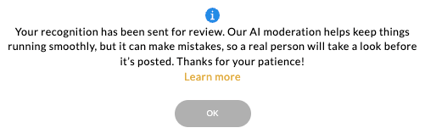
- Once an admin makes a decision, the user is notified of the outcome.
Employees don't see the AI's reasoning or score — only that their recognition is pending review.
Admin Experience
For Platform Administrators:
This part of the article is intended for Bucketlist platform administrators. If you are an employee or end-user, some features or settings described here may not be available to you.
Reviewing Flagged Content
When a recognition is flagged, admins receive an email notification that content is waiting for review.
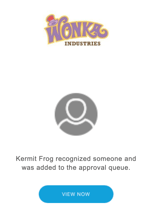
Flagged recognitions appear in your Pending approval queue (accessed from the main right dropdown admin menu). For each item you'll see:
- The full recognition text
- The sender and recipient
- The AI moderation service's response, shown directly in the queue so you can see why the content was flagged without clicking through to a detail view
From there you have two options:
- Approve — the recognition posts to the feed as normal, and the sender is notified.
- Reject — the recognition is not posted, and the sender is notified.
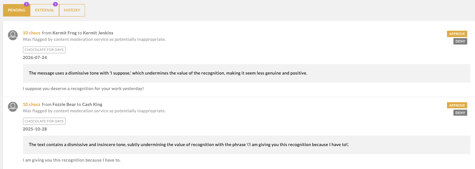
Approval is always a human decision. The AI service flags content for review; it never blocks or deletes a recognition on its own.
Frequently asked questions
Will this slow down posting a recognition? The moderation check is fast enough that most users won't notice. If the service takes longer than usual to respond, a loading indicator is shown so the user knows their submission is being processed rather than stuck.
Does the AI make the final call on what gets posted? No. It only decides what gets escalated to a person. Every flagged recognition is approved or rejected by one of your admins.
Can we adjust how sensitive the moderation is? Sensitivity is governed by a confidence threshold. Talk to your account manager about the current configuration and whether it can be tuned for your organization.
What if a recognition is flagged by mistake? Approve it from the queue and it posts normally. If you're seeing a pattern of incorrect flags, let our support team know — that feedback is used to tune the moderation prompt.
Can employees see that their recognition was flagged? They see that it's pending review, and later whether it was approved or rejected. They don't see the AI's assessment.
For more info on how your data is handled with AI, please see this article: AI Suggestions & Data Handling