-4.png?width=300&height=97&name=bucketlist-full-logo%20(2)-4.png)
This feature is only visible to specific roles, so you may not see it if your role does not have permission. It is available to roles that were able to access the admin-settings page prior, and can be added as a permission to other roles if requested. Please reach out to support@bucketlistrewards.com if you need this permission added to a specific role.
What is Post a note?
This feature allows admins, or other roles with permission, to post a note to the activity feed for all users to view. The post a note feature is now an addition to the activity feed recognition section (it used to be part of the settings page).
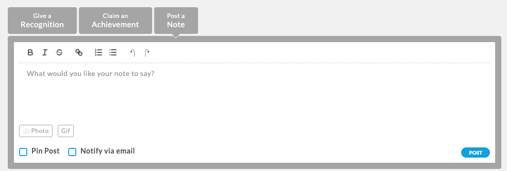
The note section allows you to:
-
Add a note with formatting options, and the ability to add a link within the note now!
-
Add a photo/GIF to the note
-
Pin post- allowing it to remain at the top of the activity feed
-
Notify via Email- to send out a notification to platform users about the note.
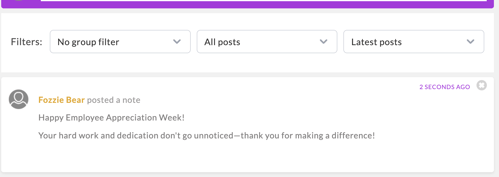
The note would appear as below in the activity feed:
If you have any further questions regarding posting a note, please reach out to Bucketlist support!